Dependencies#
Important
The dependency tab is a business-tier feature. If you are a Codacy Pro customer interested in upgrading to gain access to this feature, talk to us.
The Security and risk management Dependencies page displays a unified view of all dependencies used by your repositories, populated by Codacy's daily SCA re-scans.
Daily re-scan requirements#
Proactive SCA uses Trivy as its scanning tool. For daily re-scans to produce results on a repository, both conditions must be met:
- The Trivy tool is enabled—either through a coding standard applied to the repository, or directly via the repository's Code patterns settings.
- At least one Trivy vulnerability pattern is enabled:
Trivy_vulnerability_criticalTrivy_vulnerability_highTrivy_vulnerability_mediumTrivy_vulnerability_minorTrivy_malicious_packages
To enable Trivy across your organization, you can:
- Recommended — via coding standard: Add Trivy to a coding standard, enable its vulnerability patterns in the standard configuration, and apply the standard to your repositories. This covers all linked repositories in one step.
- Per repository: Open each repository's Code patterns page, enable the Trivy tool, and enable the relevant vulnerability patterns.
Viewing your dependencies#
To access the dependencies page, access the Security and risk management page and click the Dependencies tab.
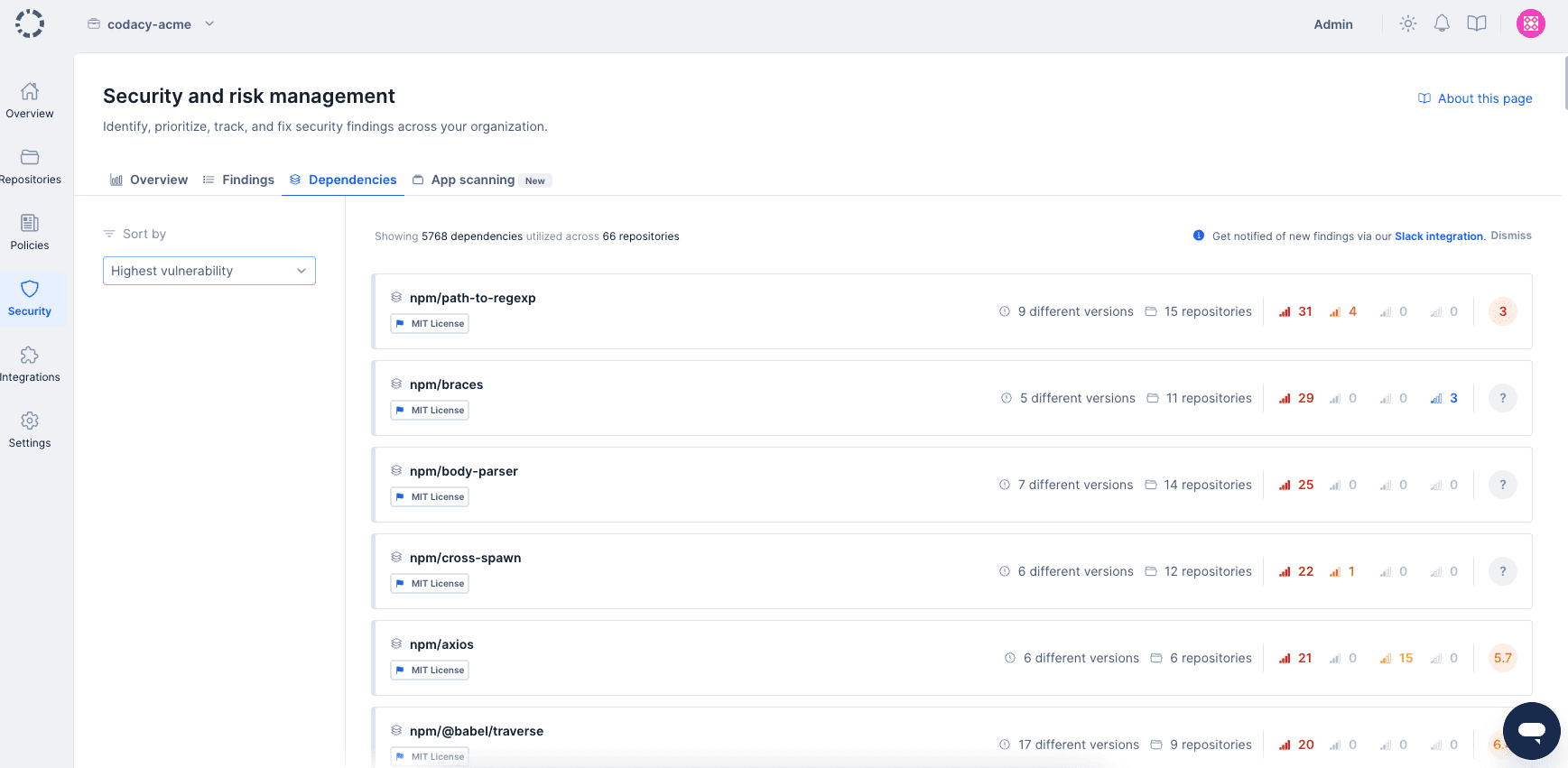
When viewing dependencies, you'll be presented with a list of the dependencies used by all repositories in your organization. For each dependency, you'll be able to see how many repositories are making use of it, how many different versions you are using across all repositories, and how many security findings were found due to the presence of that dependency.
You can sort the dependencies list using the sort dropdown to prioritize dependencies based on your security assessment needs:
- Highest vulnerability (default) - Dependencies with the most critical security findings appear first
- Lowest OSSF score - Dependencies with the lowest OSSF Scorecard security scores appear first, helping you identify dependencies that may not follow security best practices
You're also able to click any dependency to find out more information about it.
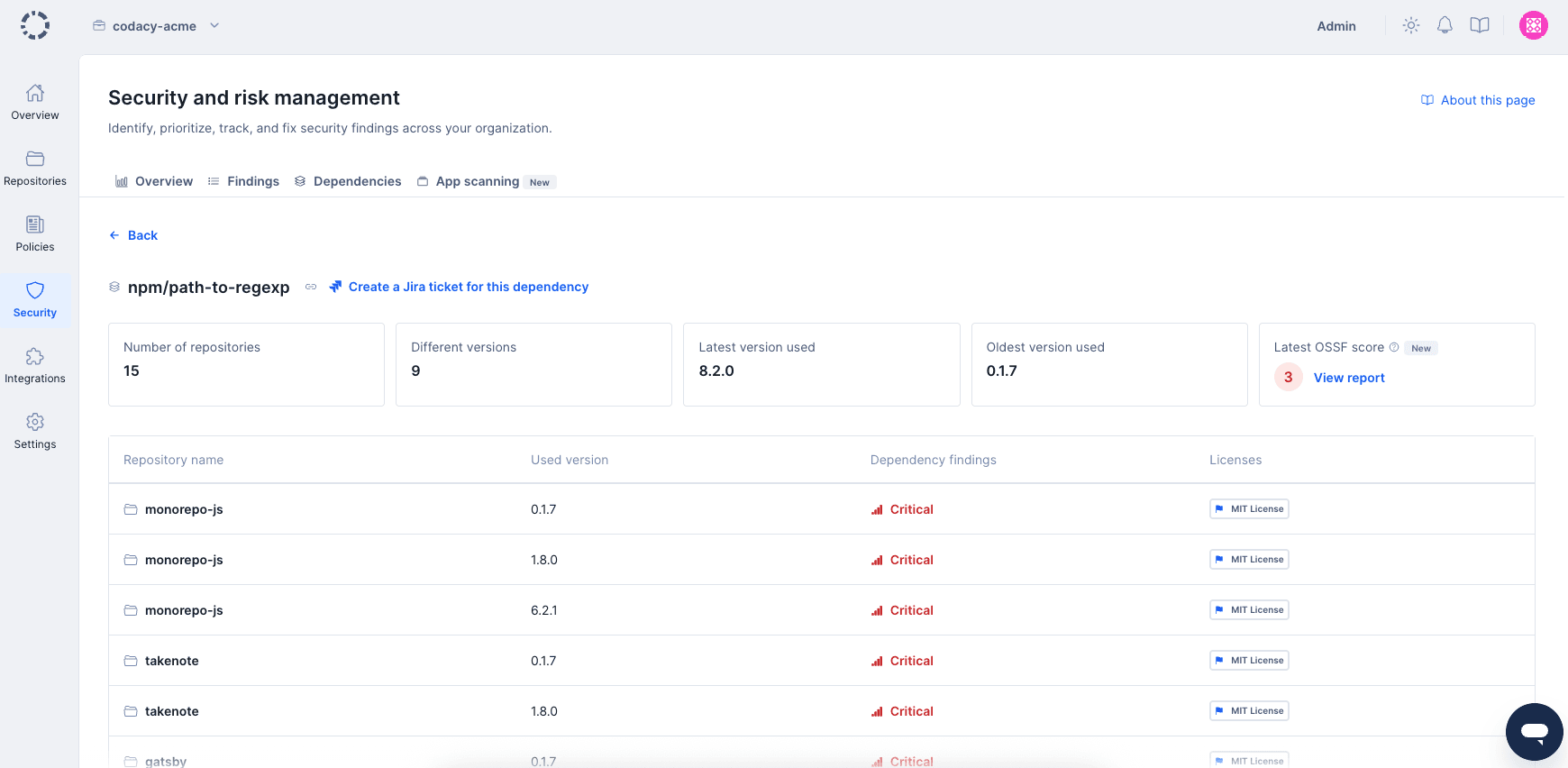
The dependency overview page offers a quick bird's-eye view of that particular dependency. You'll be able to see all different versions that are being used, including which repository is using them, the oldest and most recent versions you're leveraging, as well as the highest criticality of security issues, the license 1 applied to any particular version of that dependency, and the OSSF Scorecard security assessment.
Exporting an SBOM#
You can export the Software Bill of Materials (SBOM) for a specific repository from the Dependencies page. Codacy generates the export in CycloneDX format, covering the repository's latest scanned dependencies.
To export an SBOM:
- On the Dependencies page, click Export in the top-right corner.
- Select Export SBOM.
- In the Export SBOM modal, select a repository from the Repository dropdown.
- Click Export to download the SBOM as a JSON file.
Note
SBOM export is only available for repositories with dependency findings. If the repository you select has none, the modal asks you to pick a different one.
OSSF Scorecard#
The OSSF Scorecard feature provides additional security insights for your dependencies by displaying security assessment data from the Open Source Security Foundation (OSSF) Scorecard project.
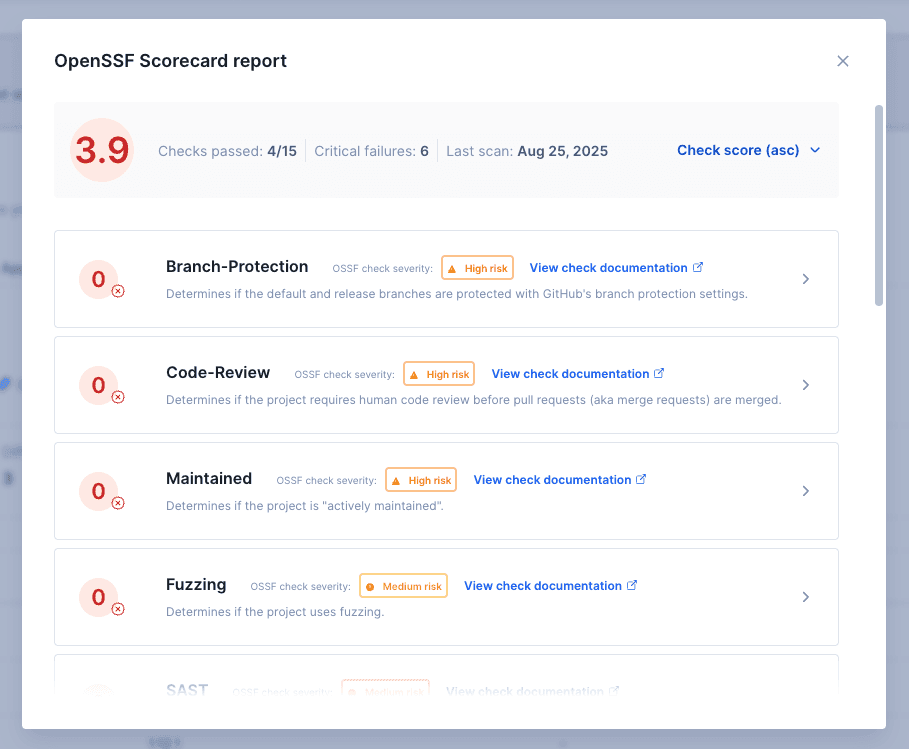
The OSSF Scorecard is an automated tool that evaluates open source repositories against a comprehensive set of security best practices. It performs various checks on a dependency's repository to assess whether the project follows security best practices and helps determine if the dependency is safe for consumption.
When available, OSSF Scorecard information appears on the dependency overview page, providing you with:
- Overall security score - A numerical score indicating the overall security posture of the dependency
- Individual check results - Detailed results for specific security practices such as:
- Code review practices
- Dependency update policies
- Security policy documentation
- Vulnerability disclosure processes
- Branch protection configurations
- Binary artifact verification
- Token permissions and usage
This information helps you make informed decisions about the security risks associated with your dependencies and identify which dependencies may require additional scrutiny or alternative options.
1: Visit the supported languages and tools page for a list of supported languages.
Was this page helpful?
Your feedback helps us improve the documentation.
255 characters left
Thanks for helping improve Codacy documentation.
For more detailed feedback, open an issue on GitHub.