Using Codacy tools with Codacy Self-hosted#
The pages for Codacy Coverage Reporter, client-side tools, the Codacy API, and submodules describe Codacy Cloud. Their steps also work on Codacy Self-hosted, with the changes on this page: your instance URL instead of app.codacy.com, and the tool versions for your Codacy Self-hosted version.
Each Codacy Self-hosted version works with these tool versions:
| Codacy Self-hosted | Codacy Analysis CLI | Codacy Coverage Reporter |
|---|---|---|
| v17.0.0 | 7.9.5 | 13.10.15 |
| v16.0.0 | 7.9.5 | 13.10.15 |
| v15.0.0 | 7.9.5 | 13.10.15 |
| v14.1.1 | 7.9.5 | 13.10.15 |
| v14.0.0 | 7.9.5 | 13.10.15 |
| v13.0.0 | 7.9.5 | 13.10.15 |
| v12.0.0 | 7.8.3 | 13.10.15 |
| v11.0.0 | 7.8.3 | 13.13.1 |
| v10.0.0 | 7.7.4 | 13.12.3 |
Codacy Coverage Reporter#
Follow Adding coverage to your repository. Before you run Codacy Coverage Reporter, set your Codacy instance URL and the Codacy Coverage Reporter version for your Codacy Self-hosted version:
export CODACY_API_BASE_URL=<your Codacy instance URL>
export CODACY_REPORTER_VERSION=13.10.15
export CODACY_API_BASE_URL=<your Codacy instance URL>
export CODACY_REPORTER_VERSION=13.10.15
export CODACY_API_BASE_URL=<your Codacy instance URL>
export CODACY_REPORTER_VERSION=13.10.15
export CODACY_API_BASE_URL=<your Codacy instance URL>
export CODACY_REPORTER_VERSION=13.10.15
export CODACY_API_BASE_URL=<your Codacy instance URL>
export CODACY_REPORTER_VERSION=13.10.15
export CODACY_API_BASE_URL=<your Codacy instance URL>
export CODACY_REPORTER_VERSION=13.10.15
export CODACY_API_BASE_URL=<your Codacy instance URL>
export CODACY_REPORTER_VERSION=13.10.15
export CODACY_API_BASE_URL=<your Codacy instance URL>
export CODACY_REPORTER_VERSION=13.13.1
export CODACY_API_BASE_URL=<your Codacy instance URL>
export CODACY_REPORTER_VERSION=13.12.3
If you use one of the alternative ways of running Codacy Coverage Reporter, such as the Docker image or a binary, use the same version.
Client-side tools#
Follow Running local analysis with the Codacy Analysis CLI at the version for your Codacy Self-hosted version. Before you run the Codacy Analysis CLI, set your Codacy instance URL:
export CODACY_API_BASE_URL=<your Codacy instance URL>
Codacy API#
Follow Using the Codacy API, using your Codacy instance domain name in the API URLs. The endpoint documentation on your instance matches your Codacy Self-hosted version:
https://<your Codacy instance domain name>/api/api-docs

https://<your Codacy instance domain name>/api/v3
The request rate limit doesn't apply to Codacy Self-hosted.
Submodules#
Follow Using submodules, with two differences:
- After Codacy enables submodules for you, update your license.
-
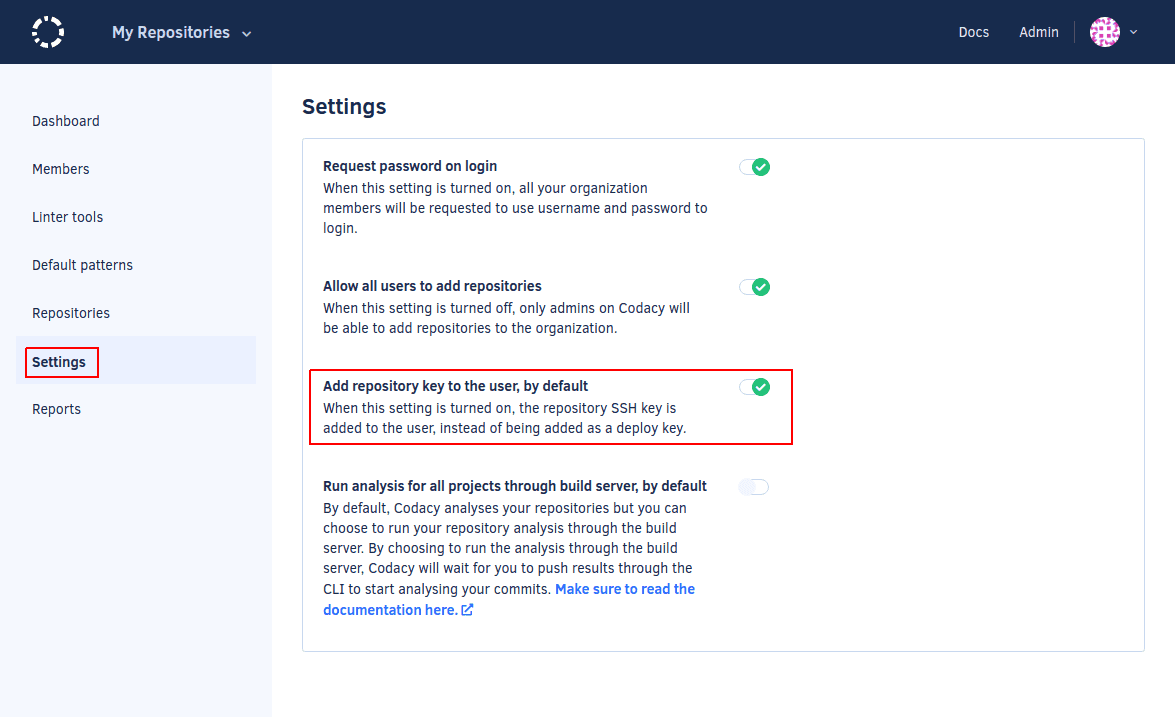
To add the SSH key to your Git provider account automatically for every new repository, enable Add project key to the user, by default on the Administration console, page Settings. This isn't supported on Bitbucket Cloud, where the setting must be turned off.
Duplication metrics#
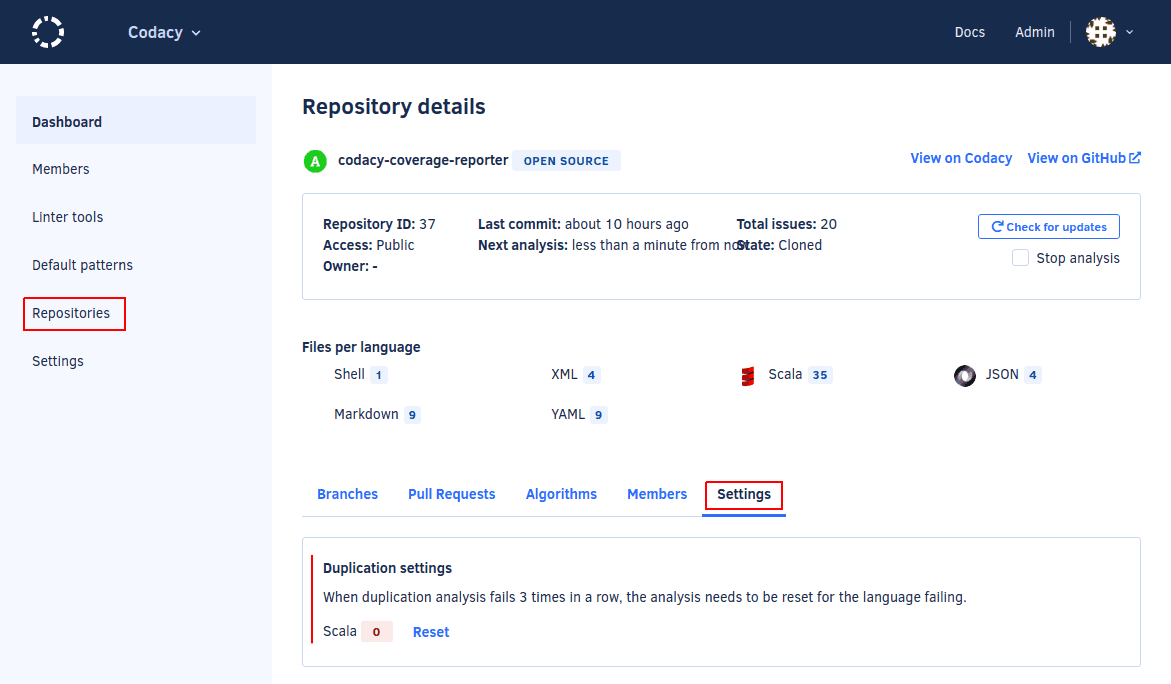
If an analysis finishes but the code duplication metric isn't calculated, reset the duplication analysis: open the Admin panel, Repositories, select the repository, tab Settings, and reset the code duplication analysis in Duplication settings. Then, reanalyze the last commit in the repository.
Seat usage#
To see how your organization uses its licensed seats, run codacy-usage-report. It reports the activity of the users on your Codacy Self-hosted instance.
If you decide to cancel, contact support@codacy.com.
See also#
Was this page helpful?
Your feedback helps us improve the documentation.
255 characters left
Thanks for helping improve Codacy documentation.
For more detailed feedback, open an issue on GitHub.